

Details sidebar
When the sidebar is enabled (default ON, toggle with V), the pane shows a lazygit-style details panel for the currently selected worktree.
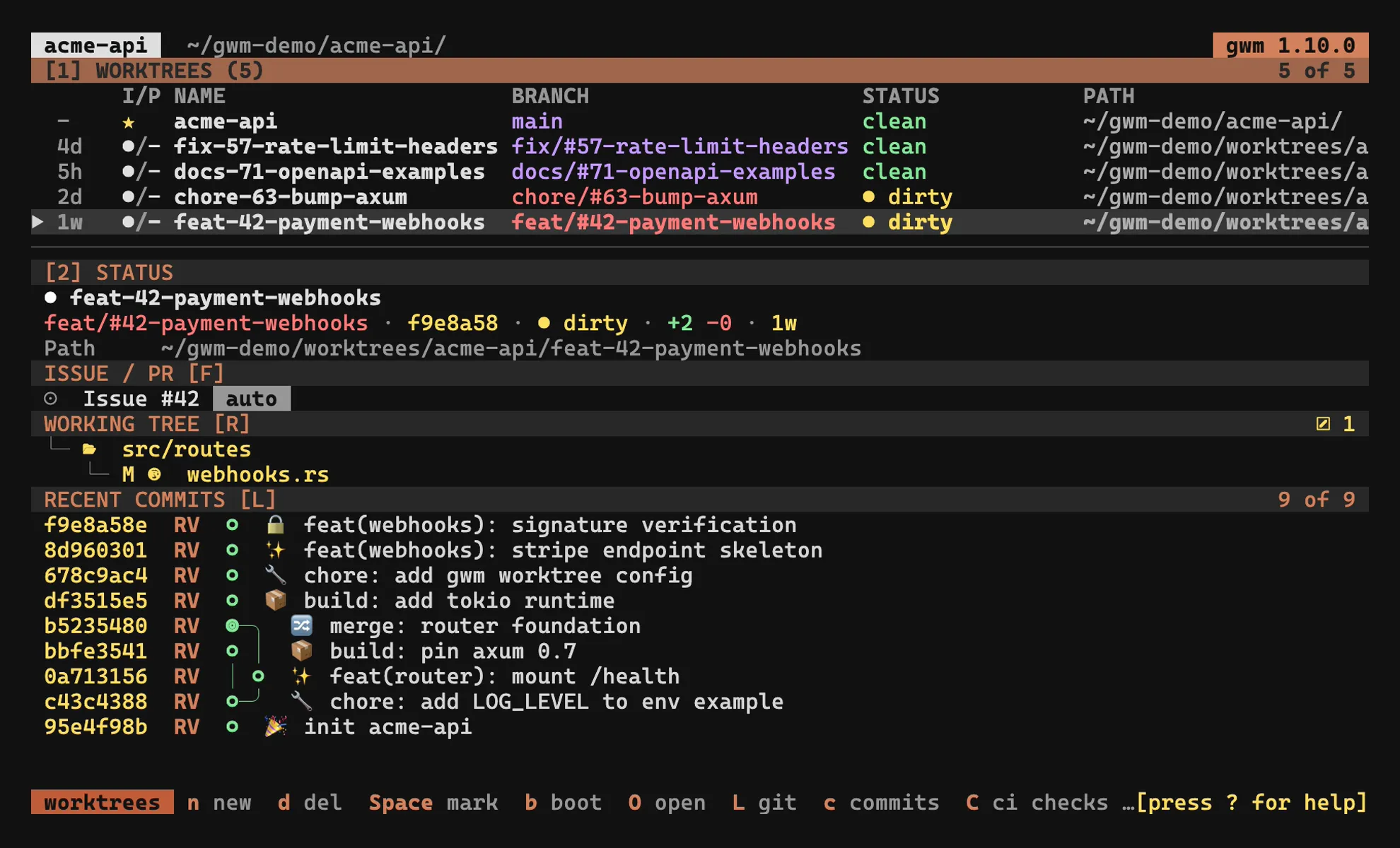
Layout: responsive orientation & position
Section titled “Layout: responsive orientation & position”By default the sidebar is stacked (SidebarOrientation::Stacked is the runtime default, issue #217): the table sits on top and the status pane below it, separated by a horizontal divider, regardless of terminal width. The width-driven behaviour below only kicks in when you cycle the orientation to auto with z.
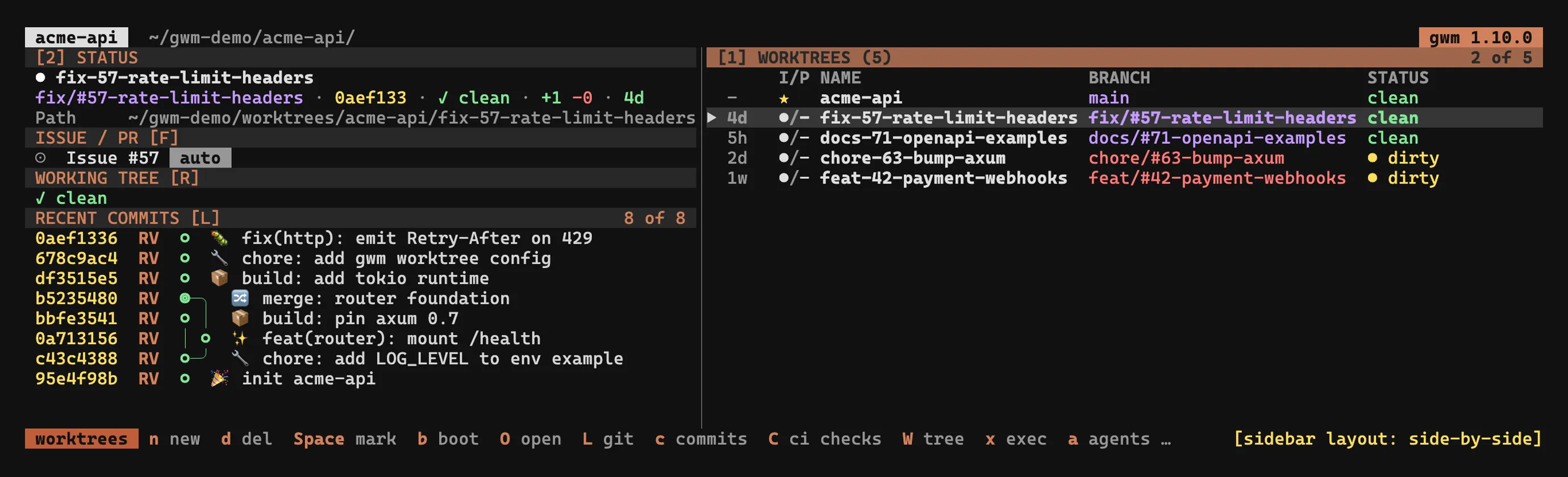
In the auto orientation the sidebar adapts to the terminal width (issue #188):
- wide (≥ 120 columns) → side-by-side: the table keeps 55 % of the width, the sidebar takes the remaining 45 %.
- narrow (< 120 columns) → stacked: the table takes 42 % of the height and the status pane the remaining 58 % below it, separated by a horizontal divider. It is no longer hidden on narrow terminals: only
V(close) reclaims the full width for the table.
Two keys override the automatic behaviour (rebindable in [tui.keys]; the #290 keymap redesign reassigned these defaults):
z(cycle_sidebar_layout) cycles the orientationauto → side-by-side → stacked → auto(the cycle starts from the stacked runtime default).autois the width-driven mode above;side-by-sideandstackedpin the orientation regardless of width.v(toggle_sidebar_position) toggles the sidebar position left ↔ right. This only affects the side-by-side layout; in the stacked layout the sidebar is always at the bottom. The default side is set by[tui] sidebar_position = "left" | "right"(defaultright) in.gwm.toml, andvflips it live for the session.
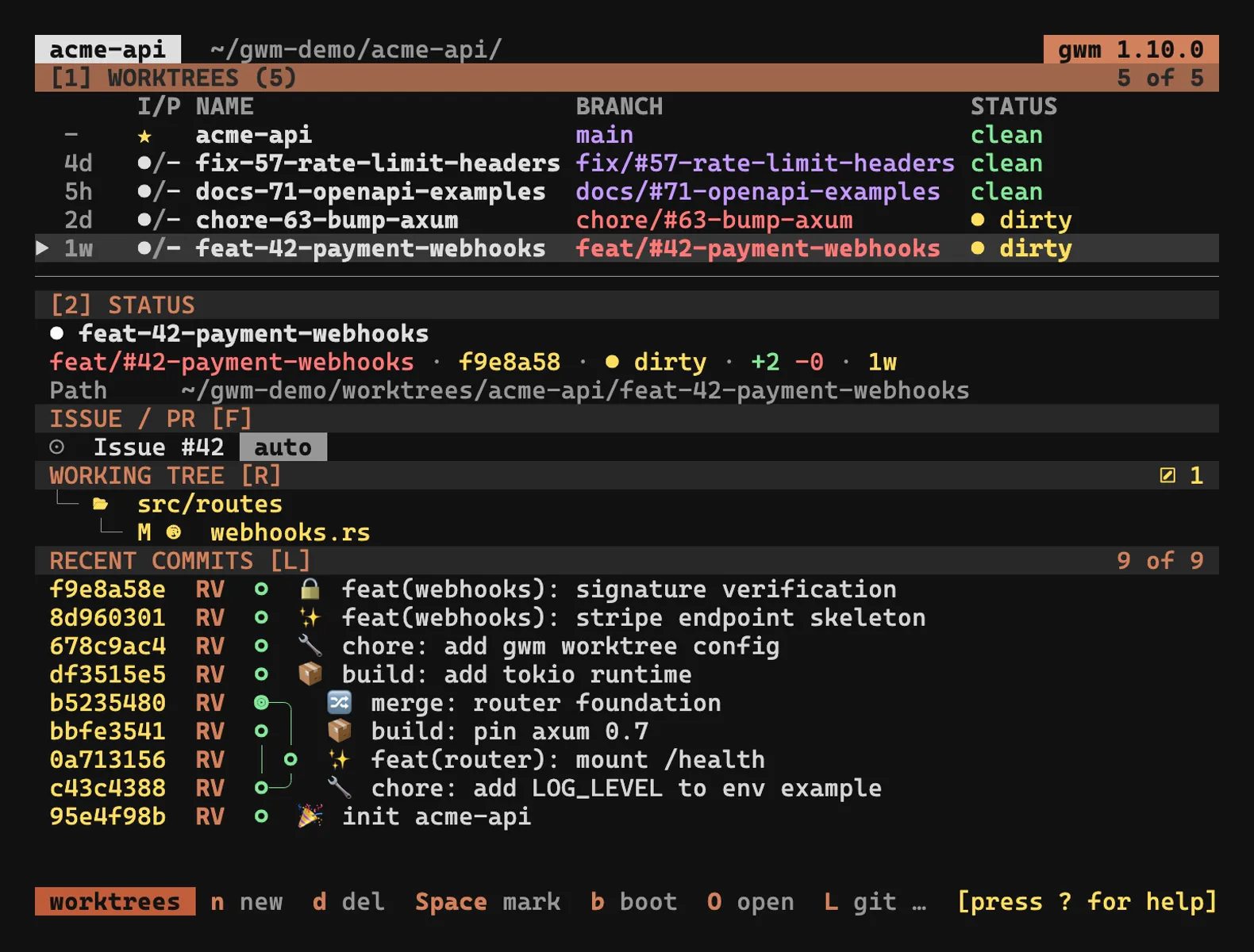
The pane is composed of four independent rounded-border subsections: section titles live on the borders themselves, so there are no inline Basic Settings: / Recent commits: lines anymore. Press Tab to focus the sidebar; j / k (or arrow keys) then scroll it instead of moving the worktree selection. The focused panel’s border paints with the theme focus role (default Cyan).
The variable-height sections (Agents, Working Tree and Recent Commits) share the column responsively. When everything fits, each keeps its natural height and Recent Commits absorbs the slack. When the terminal is short, every visible scrollable section keeps a guaranteed floor: 7 lines for Working Tree (border + 5 content rows) and 5 lines for Recent Commits (border + 3 content rows). The remaining height is then split proportionally to content size. The Agents pane, which cannot scroll, always keeps its full (bounded) height instead. Overflowing content stays reachable through the section scrolls (j / k for Recent Commits, J / K for Working Tree), and an overflowing Working Tree paints a scrollbar on its inner right edge so the viewport position is visible. An empty section still collapses entirely (clean tree, no agent session).
Header
Section titled “Header”● <worktree-name>- The
●colour tracks the linked PR / issue state:- green: open
- gray: draft
- magenta: merged
- red: closed
- darkgray: nothing linked / unknown
- The worktree name itself is coloured by
BranchStatus(worst-state wins):- red: dirty (uncommitted changes)
- yellow: ahead / behind upstream
- magenta: unpublished (no upstream)
- green: synced
- darkgray: unknown
The same colour is applied to the BRANCH column in the worktree table, so the header and the table stay visually in sync.
Worktree block
Section titled “Worktree block”The first block holds the worktree-level facts:
branch: coloured by status (same scheme as the header)path: the absolute path on disk (tilde-compressed)head: short OID of the current commitCreated: branch age in compact relative form (2d,3w,1M), colour-coded by freshness: green < 7d, yellow < 30d, darkgray otherwise. Added by #73 / #74.Diff:+<ins> -<del>of the branch versus its base trunk, using three-dotgit diff --shortstat <base>...HEADsemantics (the same base asgwm pr). Insertions paint green, deletions red. Hidden when no base resolves, when HEAD is the trunk itself, or when the branch has no committed diff yet. Added by #287.- flags:
main,locked,prunable, etc. branch status: the textual long form of the column shown in the table (clean,dirty (N files),↑N ↓M,unpublished, …)
Issue / PR block
Section titled “Issue / PR block”Hidden when nothing is linked to the selected worktree. Otherwise renders one or two live lines fetched via gh:
Issue #42 [open] TUI: fuzzy searchPR #61 [draft] CI running 8/9- The bracketed state is
gh’s view (open/closed/merged/draft). - The trailing CI indicator (issue #299) only shows up for PRs and renders an overall CI state for the linked PR, derived from the
statusCheckRollupalready fetched (no extra GitHub request):CI passing 9/9: green, all checks succeededCI failing 7/9: red, at least one check failedCI running 8/9: yellow, checks still in flight- The state follows failing > running > passing, so a red check is never hidden behind an in-flight one. A PR with no checks renders nothing.
- Refresh on demand with the
Fkey: the fetch updates the status bar with success / per-fetch error detail.
The block is auto-rebuilt every selection change, so it never shows stale data from a previously selected worktree. See GitHub issue / PR linking for the linking model.
Agents block
Section titled “Agents block”One line per pinned AI-agent session on the selected worktree
(claude / codex / opencode / vibe), coloured by freshness
(active / idle), with a human-readable last activity and the
session’s backend-reported name (first prompt, recorded title, or the
tool’s own registry, or the full id when unnamed). The pane is the deliberate view: detected-but-unpinned sessions
stay in the agent sessions overlay
(a), where a/i pin them: several pins can coexist on one worktree.
Capped at three lines with a +N more beyond that. The block collapses
entirely when nothing is pinned. Added by
#408.
Working Tree block
Section titled “Working Tree block”The selected worktree’s git status, rendered as a nested nerd-font file
tree (issue #300) rather than
a flat XY PATH list:
src/├─ tui/│ ├─ app.rs M│ └─ theme.rs A└─ worktree.rs M docs/ ?- Directories sort before files, alphabetically within each level.
- Single-child directory chains collapse (
src/tui/shown as one row, then the file under it). - Each file row carries an extension-driven file-type icon plus its
M/A/D/?status badge. - Tree connector lines (
├─/└─/│) draw the hierarchy liketree(1), painted in the muted role. An extra space pads each nerd-font glyph (most render double-width) so the following name isn’t clipped.
Everything is painted in the file’s change-category colour (issue #287), so a row matches the footer count it belongs to:
- modified → yellow
- created / untracked → green
- deleted → red
Directory rows are coloured retroactively by git: a folder takes the aggregate change-category of its subtree: only-modified → yellow, only-new → green, only-deleted → red, mixed → a neutral accent. The previous staged-vs-worktree cyan column split is retired.
Empty checkout renders as ✓ clean.
Counts footer
Section titled “Counts footer”The bottom-right footer breaks the tally into colour-coded counts: created (green), modified (yellow), deleted (red), each segment shown only when non-zero; a clean tree shows nothing. A rename counts once.
Bounds on pathological trees
Section titled “Bounds on pathological trees”A huge untracked directory can’t stall the scan or flood the non-scrollable section:
- The underlying
git status --porcelain -z --untracked-files=allscan is streamed and stopped after 5000 records (git is killed at the cap, under--no-optional-locksso it can’t leave a stale.git/index.lock). - The tree then renders at most 500 file leaves; the remainder collapses to
a single
… N morerow (… N+ morewhen the scan itself was truncated, since the true total is then unknown). -uallexpands an untracked directory into its individual files (git-ignored paths stay excluded);--porcelain -zemits paths verbatim and NUL-delimited, so filenames with spaces, arrows, quotes, or non-ASCII bytes parse unambiguously. Names are sanitised before rendering (control characters →?) so a verbatim filename can’t corrupt the layout or inject terminal escape sequences.
Recent Commits block
Section titled “Recent Commits block”A lazygit-style commit graph that fills the available height. Added by #71 / #72 and finished in #73 / #74.
Per-row format:
<8-char hash> <author initials> <node> <subject><node>is○for a normal commit,◎for a merge commit.- Subjects are hard-clipped at the panel’s right edge: no wrapping, exactly one visual line per commit.
- A right-aligned footer
<viewport-bottom> of <total>lives at the bottom of the block. - Default buffer is 300 commits (matches lazygit’s
git log -300).
The full topology renderer draws the diverging branches with │ (vertical pipe), ╮ ╭ ╯ ╰ (corners), ┴ ┬ (junctions), ─ (horizontal stroke). Linear history collapses to a single ○-stack column; merges spawn fresh columns to the right. The algorithm is width-deterministic on the commit list: the same input always produces the same output regardless of terminal width.
The pre-v0.6 Commands cheat-sheet block was dropped. Press ? for the full key map overlay instead. The 15-line block duplicated the ? overlay and pushed the Issue / PR block off-screen on common terminal sizes.
Stashes mode
Section titled “Stashes mode”Press S (rebindable as toggle_sidebar_mode in [tui.keys]) to toggle the Details panel between two modes. Added by #34 / #166.
commits(default): the existing behaviour,git log --onelineplusgit status --short.stashes:git stash listfor the selected worktree.
The panel title shows the active mode. In stashes mode the bottom hint becomes Enter: copy stash@{N} to status. The panel content is cached keyed by (worktree-path, mode), so toggling re-shells the right git command without leaking stale content between modes.
Focus and scrolling
Section titled “Focus and scrolling”- Hit
Tabto move focus into the sidebar. The currently focused panel’s border paints with the themefocusrole (defaultCyan). - With the sidebar focused,
j/k(or arrow keys) scroll its content, useful for longRecent Commitslists. - Still focused,
J/K(wt_scroll_down/wt_scroll_up) scroll theWorking Treefile tree independently: on a large change set the tree gets clamped by the layout, and the offset makes the overflow reachable. The offset resets when the selection moves to another worktree. - Hit
Tabagain to return focus to the worktree list. Vtoggles the entire sidebar on/off (useful when the terminal is narrow but ≥ 120 cols, or when you need maximum table width).