

Diagnostics and services
gwm agents [attach|detach] [--format=table|json] (issue #408)
Section titled “gwm agents [attach|detach] [--format=table|json] (issue #408)”List the AI-agent sessions detection matched to each worktree, or pin one
manually. Detection reads each agent’s on-disk session artefacts (Claude
Code, Codex, opencode, Mistral Vibe): no process enumeration, same code
path on Linux, macOS and Windows. One refinement on Unix: when Claude
Code’s live registry records a session’s PID and that process is gone,
the session drops to idle immediately instead of riding out the activity
window; elsewhere (and for the other agents) classification stays
artefact-only. The same data feeds the TUI’s AGENT
column and a overlay, gwm list (table column + JSON agents field), the
daemon and gwm statusline (fed by the daemon transport on every
platform: a unix socket, or a named pipe on Windows, #439).
gwm agents # sessions per worktree: agent, freshness, last activity, id, name # + an `unmatched` section for sessions no worktree matchedgwm agents --format=json # the same worktree rows as `gwm list --format=json`gwm agents attach . 019f6b95-… # pin session <id> to the enclosing worktreegwm agents attach feat-42 <id> # …or to the worktree matching a name substringgwm agents detach feat-42 <id> # remove that one pingwm agents detach feat-42 # remove every pin — back to pure auto-detection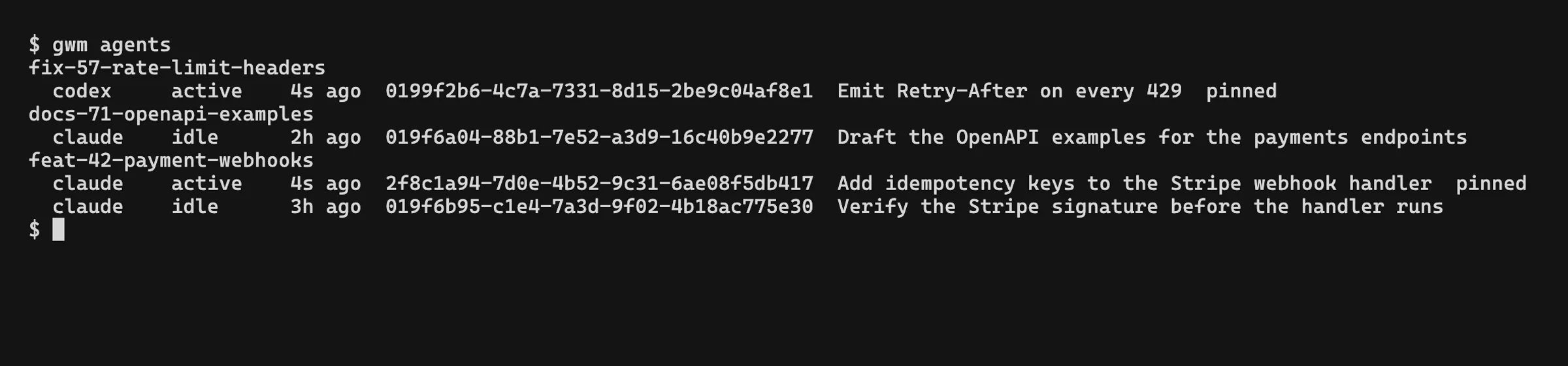
Auto-detection is the default; a pin is an override. A pin covers the
cases the recorded working directory cannot: an agent launched from a
subdirectory, a moved worktree, a session you want on a specific worktree
regardless of where it was started. Pins accumulate: several agents
can work one worktree, so attach adds a pin and detach <wt> <id> removes
just that one (bare detach <wt> clears them all). Stored in git branch
config (multi-valued gwm-agent-pin), never committed. The sidebar’s
Agents pane shows only pinned sessions: pinning is how a session earns
its place there.
Attaching a session id that detection cannot resolve exits with status 1; a pin whose
artefacts later disappear degrades silently back to detection. Detached-HEAD
worktrees cannot hold a pin. Sessions matched to no worktree (launched
in another repo, a subdirectory, an old path) are listed under an
unmatched section: precisely the ids attach takes.
GWM_AGENTS_HOME overrides the home directory the artefact scans read,
mainly a deterministic seam for tests and CI.
gwm doctor [--format=text|json]
Section titled “gwm doctor [--format=text|json]”Run 8 health checks; report each with ✓ / ! / ✗; exit 0 / 1 / 2. Designed for CI and pre-commit hooks. See Integrations → gwm doctor for the per-check breakdown.
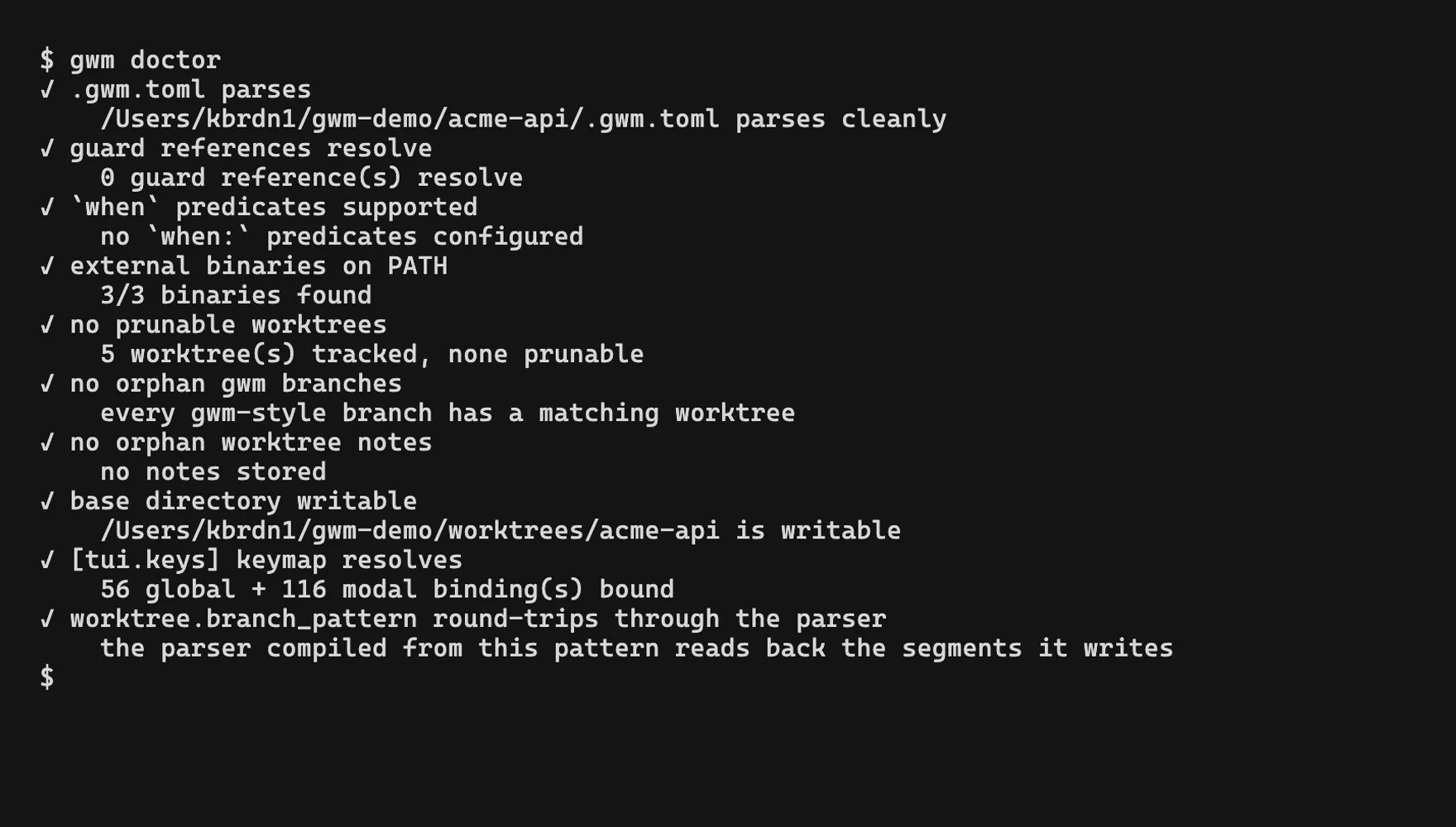
--format=json (issue #38) emits the checks array plus aggregate severity and exit_code, with the schema at docs/schema/doctor.schema.json. The process exit code is identical to the text form (the JSON also carries it as a field), so gwm doctor --format=json still works in an if-guard:
gwm doctor --format=json | jq '.checks[] | select(.status == "failed")'gwm daemon [--socket <path>] [--poll-ms <ms>] (issue #38)
Section titled “gwm daemon [--socket <path>] [--poll-ms <ms>] (issue #38)”Run gwm as a long-running JSON-RPC 2.0 daemon over a unix domain socket (a named pipe on Windows, #439), so editors / statusbars / tooling connect once instead of spawning gwm per query.
gwm daemon # bind $XDG_RUNTIME_DIR/gwm.sock (→ $TMPDIR → /tmp)gwm daemon --socket /tmp/gwm.sock # explicit socket pathgwm daemon --poll-ms 500 # faster subscribe push, more git scansWire format: newline-delimited JSON (NDJSON): one request object per line, one response per line.
| Method | Params | Result |
|---|---|---|
list |
(none) | array of worktrees (schema) |
doctor |
(none) | doctor report (schema) |
path |
{ "pattern": "<str>" } |
{ name, path, branch } (schema) |
subscribe |
(none) | stream of worktrees.changed notifications (first = current snapshot) |
# request/response (one line in, one line out)printf '{"jsonrpc":"2.0","method":"list","id":1}\n' | nc -U "${XDG_RUNTIME_DIR:-${TMPDIR:-/tmp}}/gwm.sock"subscribe turns the connection into a one-way push stream: the daemon sends a worktrees.changed notification with the current snapshot, then one on every change. Change detection is interval polling of the worktree set (tuned by --poll-ms, default 1000), a deliberate MVP choice over a filesystem watch so there’s no extra dependency and the behaviour is deterministic; update latency is bounded by the poll interval.
Platform / build: behind the default-on daemon Cargo feature. Unix binds a unix domain socket (--socket is a filesystem path); Windows binds a named pipe (#439, --socket is the pipe NAME under \\.\pipe\, default gwm-<user>.sock, restricted to the owner by its security descriptor). On a --no-default-features build the subcommand exits with an explanatory error (it stays listed so --help is identical everywhere).
--poll-ms must be ≥ 1 (0 is rejected: it would spin the subscribe loop with no wait, re-scanning git as fast as the CPU allows).
gwm statusline [--socket <path>] [--watch] (issue #309)
Section titled “gwm statusline [--socket <path>] [--watch] (issue #309)”Print a compact one-line worktree summary for a shell prompt, the first bundled consumer of gwm daemon. It connects to the daemon socket, asks for the worktree set, and renders the active branch, worktree count, dirty / ahead / behind, and the linked issue / PR.
gwm statusline # one-shot, prints one line and exitsgwm statusline --watch # subscribe; reprint on every changegwm statusline --socket /tmp/gwm.sock # explicit daemon socketfeat/#309-daemon-consumer · 3 wt · * ↑1 · #309 · PR #310Tokens: branch (or worktree name when detached), N wt count, * dirty, ↑n/↓n ahead/behind, #N issue, PR #N. The active worktree is the one enclosing the current directory; outside any worktree only the count is shown. A CI rollup is intentionally not included (not part of the daemon’s stable schema).
Graceful degradation: when no daemon is reachable, gwm statusline prints an empty line and exits 0, so a prompt substitution degrades to nothing instead of erroring. Same --socket resolution as gwm daemon. See Integrations → Daemon consumers for prompt recipes (zsh / tmux / starship) and an editor recipe (Zed / VS Code).