

Keybindings
The full key map for gwm’s ratatui interface. Press ? at any time for the same table as an in-app overlay.
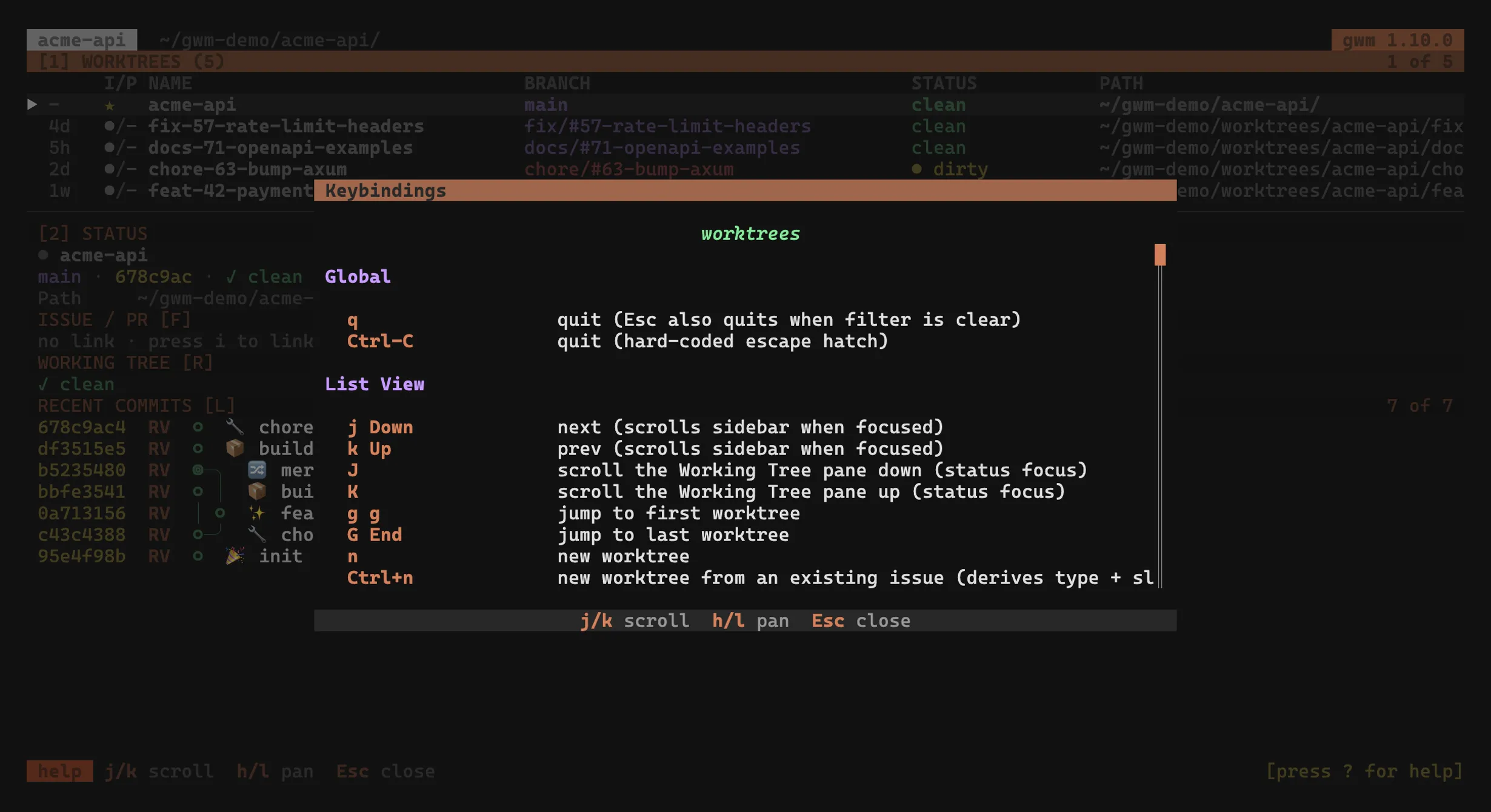
The keymap is fully configurable. Every binding below is a default: the
[tui.keys]block in.gwm.tomlrebinds any list-view action, including multi-key chords likeg g. The?help overlay is keymap-driven, so it always renders the bindings you actually resolved, not these defaults. See Keymap & command palette and Configuration →[tui.keys].Modal keys are rebindable too. The keys inside each overlay below are defaults of typed verbs under
[tui.keys.modal.<context>](#219). The same physical key can mean different things per modal (Enterissubmitin the create form butactivatein the delete-confirm modal).Ctrl+C, the list view’s contextualEsc/Enter, and the PTY overlay’s emergencyEscstay hard-coded by design. See Keymap & command palette.
Keymap redesign (v0.10): #290 reshuffled the list-view bindings into logical chords and added several verbs (pull / push, rename, exit-to-worktree, branch / worktree-name yanks, mux pane, user macros). The table below is the resolved default set printed by
gwm tui keys. Pre-#290[tui.keys]slugs (git_tui,review,yank,open,open_menu, …) still load through backward-compat aliases, so an existing override keeps working.
List view (default)
Section titled “List view (default)”| Key | Action (slug) |
|---|---|
↑ / k |
previous worktree (up), scrolls the sidebar when it has focus |
↓ / j |
next worktree (down), scrolls the sidebar when it has focus |
J / K |
scroll the Working Tree pane down / up (wt_scroll_down / wt_scroll_up), status focus only |
gg |
jump to the first worktree (top) |
G / End |
jump to the last worktree (bottom) |
n |
new worktree (create; form: type → issue → description) · gated by the TOFU trust ledger, refuses with a status-bar hint on untrusted .gwm.toml |
Ctrl+n |
new worktree from an issue that already exists (create_from_issue), see from an existing issue |
e |
rename the selected worktree (edit_worktree; form pre-filled from the current branch), renames the local branch, the remote branch if it exists, and moves the worktree directory, all off-thread |
N |
edit the selected worktree’s note in a modal (edit_note), see notes |
Space |
mark / unmark the highlighted worktree (toggle_select), see bulk delete |
d |
delete the marked worktrees, or the highlighted one when nothing is marked (delete; confirm y · countdown when D is armed, see confirm-overlay) |
D |
toggle “delete branch on remove” (delete_branch) |
b |
re-run bootstrap on the selected worktree (bootstrap), off-thread (the statusbar spinner animates while it runs; the Report view opens when it finishes) · same trust gate as n |
s |
sync the selected worktree onto its upstream (sync): fetch + rebase, off-thread (statusbar spinner); refuses a dirty tree / missing upstream / conflicts |
p |
git pull the selected worktree’s branch (pull), off-thread (progress in the status bar) |
P |
git push the selected worktree’s branch (push), off-thread |
f |
refresh the worktree list (refresh) |
F |
refresh the GitHub issue / PR status (fetch_github): off-thread gh fetch, statusbar spinner |
E |
quit the TUI and print the selected path to stdout (exit_to_worktree), enables cd "$(gwm)" shell patterns |
o |
open a native $SHELL in an embedded PTY overlay at the worktree (terminal_pty) |
O |
open a native $SHELL fullscreen, suspending the TUI (terminal_fullscreen) |
l |
launch the configured [git_tui] command in an embedded PTY overlay (lazygit_pty) |
L |
launch the configured [git_tui] command fullscreen (lazygit_fullscreen) |
r |
launch the configured [review] command in a PTY overlay (review_pty): AI / web reviewer over git diff base..head |
R |
launch the configured [review] command fullscreen (review_fullscreen) |
t |
open the selected worktree in a new tmux / zellij / herdr pane (mux_pane), where [tui] mux_open_in picks the level (pane, tab, or a herdr workspace) and mux_pane_direction the half a pane takes; falls back to a status-bar hint when no multiplexer is detected |
h |
run the user-configured [tui.macro1] command (macro_one) |
H |
run the user-configured [tui.macro2] command (macro_two) |
y |
yank the selected worktree’s branch name to the clipboard (yank_branch_name) |
Y |
yank the selected worktree’s path to the clipboard (yank_path): pbcopy / wl-copy / xclip / xsel / clip |
w |
yank the selected worktree’s slug / name to the clipboard (yank_worktree_name) |
B |
open menu for the linked issue / PR (browse_links; i issue, p pr → spawns browser) |
. |
open the gwm documentation in the default browser (open_docs) |
i |
link prompt (link): choose i or p, then digits, to attach an issue / PR |
V |
toggle the details sidebar (toggle_sidebar), on a narrow terminal it stacks under the table instead of hiding |
S |
toggle the sidebar Details mode (toggle_sidebar_mode): commits ↔ stashes, see stashes mode |
z |
cycle the sidebar layout (cycle_sidebar_layout): auto (width-driven) → side-by-side → stacked |
v |
toggle the sidebar position left ↔ right (toggle_sidebar_position; side-by-side layout only) |
Tab |
swap focus between the worktree list and the sidebar (focus_swap) |
1 |
focus the worktrees pane (focus_worktrees) |
2 |
open (if hidden) and focus the status pane (focus_status) |
3 |
open the Command Logs overlay (command_logs): scrollable transcript of the commands gwm ran |
4 |
open the Settings panel (config_panel): edit theme / worktree / TUI knobs and all keymaps, with a per-row source column |
W |
open the Working Tree overlay (working_tree): the sidebar’s file-explorer listing at full size |
c |
open the commit listing (commits): the sidebar’s Commits pane at full size, with a load-more key |
x |
open the exec picker overlay (exec_overlay): pick a [exec.profiles] profile and run it in a PTY overlay on the selected worktree |
X |
open the clean overlay (clean_overlay): preview and reclaim build artifacts in the selected worktree (safety countdown before deleting) |
a |
open the agent sessions overlay (agent_sessions): list the AI-agent sessions (Claude Code, Codex, opencode, Mistral Vibe) attached to the selected worktree |
C |
open the CI checks overlay (ci_checks): one row per check of the linked PR’s rollup |
I |
open the PR / issue view (rich_view): the linked PR’s (or issue’s) description, metadata, reviews and conversation |
m |
merge the linked PR (merge_pr), behind the same confirmation the delete flow uses. Says what it cannot do rather than opening an empty modal: nothing linked, or linked but not fetched |
/ |
open the fuzzy filter bar (filter; Enter confirms · Esc clears) |
: |
open the command palette (command_palette) |
Enter |
show selected path in status bar |
? |
help overlay (help) |
q |
quit (quit) |
Esc |
clear a sticky filter if any, otherwise quit |
Bulk delete (Space + d)
Section titled “Bulk delete (Space + d)”Space marks the highlighted worktree, d then deletes every marked row in
one batch. With nothing marked, d is the single-row delete it has always been.
A ✓ column appears while the set is non-empty, and the pane footer carries the
count (3 of 12 · 2 marked).
Only d reads the mark set. b / s / p and every other verb keep acting on
the highlighted row, which is exactly why the footer shows the count.
-
Lifetime: opening the filter (
/) and the manual refresh (f) clear the marks. The background auto-refresh does not, it only drops rows that no longer exist, so a 60s timer cannot eat a selection you are still building. Marking inside a filtered view works, and marks are keyed by path so they survive the fuzzy reranking. -
The main worktree cannot be marked, same reason
drefuses it. -
Confirm: for a batch the overlay reports
N selectedand how many targets carry a branch instead of listing rows, andDarms the branch deletion for the whole batch, not per row. -
Failures do not stop the batch: every target is attempted, the list reloads, the status line reads
removed 2 of 3 worktrees; failed: …, and the confirm stays open narrowed to what failed. A row that is still listed keeps its mark, so a retry is one keystroke; one that git already dropped from its list (a removal that pruned the admin entry and then failed on the filesystem) leaves the directory behind forgwm pruneand a manual delete. -
Hooks and undo: a delete here runs the same sequence
gwm removedoes, so[hooks.pre_remove]/[hooks.post_remove]fire and every removed worktree is recorded forgwm undo, one entry per worktree. Apre_removethat refuses refuses that target and the batch carries on. There is no--skip-hookshere; to delete past a hook, use the CLI with--force. Because a hook is code out of.gwm.toml, a repo whose config defines remove hooks is checked against the trust ledger first, and an unapproved one refuses the delete instead of skipping the hook.
The non-interactive counterpart is gwm remove a b c.
Space was the sidebar layout cycle before #484; that verb now lives on z. Both defaults are one [tui.keys] line away (cycle_sidebar_layout = ["Space"], toggle_select = ["z"]). If your .gwm.toml binds a chord starting with z (say top = ["z z"]), that is now a prefix conflict against a shipped default and is refused at load time: rebind it, or move cycle_sidebar_layout somewhere else.
Notes (N)
Section titled “Notes (N)”N opens the selected worktree’s note in a modal you type straight into. A note is usually three lines written in the ten seconds between two thoughts, and suspending the whole TUI to spawn an editor is a heavier gesture than that. Ctrl+e inside the modal hands the same file to $EDITOR when the note needs more, through the handoff o uses in mode = "editor": editor_cmd in .gwm.toml, then $EDITOR, then vi. What that editor writes is reloaded into the modal when it exits.
Esc writes and closes, and with the vim mode below (on by default) it takes two presses: the first leaves insert, the second writes. There is no “quit without saving” either way. The reflex on leaving a note is to keep it, and the alternative makes Esc destroy prose nothing can regenerate. To delete a note, empty it: a blank buffer removes the file rather than leaving one that reads as absent everywhere. A buffer nothing touched is not written at all, so opening a note to read it does not move its mtime.
The editor takes text, Enter, Backspace, Delete, the four arrows, Home / End and PageUp / PageDown. None of those are rebindable, because in a text buffer they are text: the four verbs under [tui.keys.modal.note] are close (Esc), open_editor (Ctrl+e), toggle_bullet (Ctrl+u) and toggle_checkbox (Ctrl+t). Long lines scroll rather than wrap, so the caret always sits on the character it will push; Ctrl+e is the answer for prose that needs the width.
Lists and checkboxes (#557)
Section titled “Lists and checkboxes (#557)”A note becomes a checklist after a day, because “what to check before opening the PR” is a list you tick off. Two chords write one:
| Key | Effect |
|---|---|
Ctrl+u |
make the line a list item (- ), or take the marker back off it |
Ctrl+t |
tick the box on the line, spawning one (- [ ] ) if it has none |
Enter |
continue the list, or end it when the item is empty |
Both are Ctrl-modified for the reason the whole modal exists: an unmodified printable is text here, and binding one to a note verb is refused at load time. Which chord is left over is decided by tmux: Ctrl+b is its prefix, and Ctrl+h / Ctrl+j / Ctrl+k / Ctrl+l are the vim-tmux-navigator pane set that ships in tmux.nvim and in most dotfiles that copied it. tmux forwards those only to a pane running vim, so inside tmux they never reach gwm at all.
Ctrl+t ticks from anywhere on the line, so the gesture is one key and no navigation. A bullet gains an empty box rather than a ticked one: the first press writes the item, the second ticks it. Ctrl+u on a checkbox line removes the whole marker, since - [ ] is a bullet too and leaving a widowed [ ] behind is not what “no longer a list item” means.
Enter on a list item carries the marker onto the next line, indentation included, and a box is never continued ticked. Enter on an item whose text is empty ends the list instead, which is the second Enter every Markdown editor breaks out on. A line has to look like an item to be treated as one: -foo is prose and --flag is a flag, and both keep their text.
Vim normal mode (#557)
Section titled “Vim normal mode (#557)”The editor has a normal mode, and it is on by default. N opens in normal mode, the title carries a NORMAL / INSERT chip, and the modal’s own last row leads with the mode as a colour badge before listing the keys that mode takes.
The cost is Esc: it leaves insert rather than writing and closing, so saving takes two presses. [tui] note_vim = false buys the single-press gesture back and returns the editor to the one #515 shipped, where every printable is text and there are no modes at all.
| Key | Effect |
|---|---|
h j k l |
move. h / l stop at the line ends; the arrows still wrap onto the neighbouring line |
w b e |
word forward / back / end. W B E for blank-separated words |
0 ^ $ |
first column, first non-blank, last char |
gg G |
first / last line |
x dd |
delete the char under the caret / the line |
i I a A |
insert before the caret, at the first non-blank, after the caret, at the end of the line |
o O |
open a line below / above and start typing, carrying the list marker |
Esc |
insert to normal, then normal writes and closes |
No counts (3j), no registers, and therefore no p and no undo. This is a scratch buffer three lines long; Ctrl+e hands the file to the real vim for anything that wants the rest. The caret sits on a character in normal mode rather than one past the last one, or x at the end of a line would delete nothing.
The verbs stay hard-coded rather than rebindable, exactly as the arrows are: [tui.keys.modal.note] holds the same four verbs with or without the knob, and an unmodified printable bound to one of them is still refused at load time. Backspace, Enter and Delete are text in insert mode, so in normal mode they mean h, j and x instead of editing.
A note is what only you can write down: what you had just figured out, what is blocking, what to check before opening the PR. gwm already knows the branch, the linked issue, the diff against base and the agent session, and none of that says where you were.
The table carries a markdown marker on the rows that have a note, the nerd-font glyph the Working Tree pane paints on a .md file, because a note is one. It is deliberately binary, one glyph, one colour, no preview and no length: this row carries a note or it does not. The column only exists once at least one visible row has one, so a user who never writes a note keeps the exact table they had before, and it captions itself with that same glyph so the marker reads as its own column instead of a third slot of the I/P group.
- Storage: a plain Markdown file at
<main-checkout>/.git/gwm/notes/<branch>.md, mirroring therefs/heads/layout, so a branchfeat/#515-notesisfeat/#515-notes.md. Greppable and editable with gwm shut down, never committed, readable from the main checkout, and it survivesgwm remove. That last point is why it lives in the main checkout rather than inside the worktree: the note is usually still worth having between the removal and the merge. - Presence means non-blank. A modal closed without typing leaves no file at all, and
$EDITORsaved over an empty buffer leaves a single newline. Neither lights the marker. - Keyed on the branch, with five consequences worth stating. A row on a detached HEAD has no branch to key on and says so in the status bar rather than doing nothing. A rename (
e) moves the note with the branch. And a branch name git accepts but no filesystem can back (< > " |, a component ending in., a reserved device name likeCON) carries no note, refused out loud rather than written under a name that means a different branch on another platform. And a rename onto a name that already carries a note is refused before anything moves:git branch -mwould have rejected an existing branch, so that note is an orphan from a previous branch of the same name, and prose nothing can regenerate is not something to lose to a name reuse. And two branch names a volume folds together (feat/fooandfeat/Fooon macOS or Windows, or an accented name against its differently-cased twin) share one file, soNrefuses the pair by name rather than opening one branch’s editor on the other’s prose. - Lifecycle: the note lives as long as the branch, and
gwm doctorreports the ones whose branch is gone. Notgwm clean, whose stated safety property is that--yesonly removes directories git already ignores; deleting prose under it would contradict that.
Read one from the CLI with gwm note show, or off the --format=json list rows, which carry the text in an additive note field.
N was unbound before #515. If your .gwm.toml binds a chord starting with N (say top = ["N x"]), that is now a prefix conflict against a shipped default and is refused at load time: rebind it, or move edit_note somewhere else.
Confirm-delete overlay
Section titled “Confirm-delete overlay”The overlay shows two selectable buttons, [ Confirm ] / [ Cancel ],
with focus defaulting to Cancel, the safe choice for a destructive
action, so a stray Enter cancels rather than deletes. The classic
y / n shortcuts still work regardless of focus.
| Key | Verb ([tui.keys.modal.confirm]) |
|---|---|
← / h |
focus [ Confirm ] (focus_confirm) |
→ / l |
focus [ Cancel ] (focus_cancel) |
Tab |
toggle focus between the two buttons (toggle_focus; defaults to Cancel) |
Enter |
activate the focused button (activate; Confirm → delete · Cancel → dismiss) |
y |
confirm (confirm; classic) or arm the countdown (when D is armed, see countdown) |
y again |
during an armed countdown, disarms it without firing |
n / Esc |
cancel (cancel) |
While the safety countdown is armed an animated spinner sits beside the progress bar as a live loader.
Create / rename overlay
Section titled “Create / rename overlay”Both the New Worktree form (n) and the rename form (e) share the same
[tui.keys.modal.create] verbs:
| Key | Verb ([tui.keys.modal.create]) |
|---|---|
Tab |
next field (next_field) |
BackTab (Shift+Tab) |
previous field (prev_field) |
↑ / ← / h |
previous worktree type (prev_type; on the type field) |
↓ / → / l |
next worktree type (next_type; on the type field) |
Ctrl+t |
toggle structured ↔ free-form naming (toggle_mode) |
Enter |
submit and bootstrap / rename (submit; subject to the TOFU trust gate) |
Esc |
cancel (cancel) |
Ctrl+t flips the New Worktree form between the <type>/#<issue>-<desc> triple and a single free-form Name field (#416). Free-form mode drops the type selector and the issue field (it has no notion of either) and validates the name on submit rather than per keystroke, so an intermediate state can be typed through. Both sides keep what you typed, so toggling to look at the other form loses nothing. What a free-form worktree gives up is listed in CLI → free-form naming.
The binding is Ctrl-modified on purpose: the create overlay reserves unmodified printable keys for its text fields, so a bare letter would be swallowed while typing a description.
It works in the rename form too (#479). It used to be inert there, because that form rendered and submitted the triple only, so toggling would have typed into a field it never showed; the form now has both modes, so the verb does what its name says.
A worktree created with gwm create --name opens the rename form in free-form mode with its current branch prefilled, instead of being turned away as it was before. Ctrl+t then moves between the two shapes in either direction, which is what makes the four renames possible:
| from | to | branch becomes | directory becomes |
|---|---|---|---|
| free-form | free-form | the name, verbatim | the name, with / flattened to - |
| free-form | structured | branch_pattern applied to the triple |
path_pattern applied to the triple |
| structured | free-form | the name, verbatim | the name, with / flattened to - |
| structured | structured | unchanged | unchanged |
Toggling seeds only what is still empty, so a round trip never overwrites what you typed. Leaving structured seeds the name with the current branch verbatim. Leaving free-form seeds the description with a kebab-cased form of the name, capped at the same length the field accepts when typed, and leaves the issue empty because a free-form name carries no issue number. The type is neither seeded nor blanked: it stays on whatever the selector shows, which is the first configured type on a form you just opened, exactly as in the New Worktree form. It is visible in the selector and the preview spells out the branch it produces, so read that line before submitting if you are promoting a spike into the pattern.
Names are validated with exactly the rules gwm create --name uses, so a name one form refuses the other refuses too. The main worktree is never renamed from here: its branch is the repo’s default branch, and git worktree move cannot move the main checkout anyway.
If the repo’s .gwm.toml isn’t trusted, Enter lands the form’s status bar on a refuse message instead of running the bootstrap: the worktree directory is not created in that case, so you can fix the trust state in another terminal (gwm bootstrap from CLI, or set GWM_ALLOW_BOOTSTRAP=1 and relaunch) and retry. See Configuration → TOFU trust ledger for the exact wording and full decision tree.
Settings panel (4)
Section titled “Settings panel (4)”4 opens the in-TUI Settings panel. Tabs (Tab / Shift+Tab) split it into
Theme, Worktree, TUI, Keys and the read-only All resolved-config
view. L flips the edit layer between the project .gwm.toml and the
user-global config; the layer selector decides which file an edit writes.
| Key | Action |
|---|---|
Tab / BackTab |
next / previous tab |
↑ / ↓ |
select a field / binding (scrolls on the All tab) |
L |
toggle the edit layer (project ↔ global) |
Space / Enter |
activate: cycle a choice, edit a value, or rebind a key |
Esc / q |
close |
Keys tab: live keymap editor
Section titled “Keys tab: live keymap editor”The Keys tab lists every rebindable binding: the global list-view
actions ([global]) and every modal verb grouped by context
([modal.<context>]), each with its current key(s) and a default / user /
repo source badge. Select a binding and press the activate key (Space /
Enter) to capture a new key. The key column becomes a [ … ] input:
| Key | Action |
|---|---|
| any key | record it into the binding |
Enter |
commit a multi-stroke global chord (modal verbs auto-commit on the first key) |
Backspace |
drop the last captured stroke (global chord) |
Esc |
cancel the capture, leaving the binding unchanged |
The capture writes the binding as a TOML array to the targeted layer
([tui.keys] for a global action, [tui.keys.modal.<context>] for a modal
verb), validates it (a conflict / prefix-collision aborts the write and leaves
the previous binding live), and reloads the keymap so the new key works
immediately. An empty capture (Enter with nothing recorded, global only)
unbinds the action. Esc, Enter, Backspace and Ctrl+C can’t themselves
be assigned via capture: hand-edit .gwm.toml for those (see
[tui.keys]).
Working tree overlay (W)
Section titled “Working tree overlay (W)”The sidebar’s Working Tree pane, given the whole screen. Same tree, same
nerd-font icons, same per-category colours and the same <glyph> <n> change
counts on the bottom rule. The difference is that a change set of more than
a handful of files reads in one go instead of two rows at a time through
J / K.
The listing is read when the overlay opens, so it does not depend on the
sidebar being visible or on which Details mode (commits / stashes) is
selected: W shows the change set even with the sidebar hidden. Re-open to
pick up changes made while it was closed. The read runs in the background,
so the overlay opens on loading… on a repository large enough for git status to take a moment; the keys work while it waits.
The right of each row carries what the tree does not: how many lines the
file gained and lost, as +120 -34, in the same colours the commit listing
uses for its own counts. A category with nothing in it is left out rather
than printed as a zero.
The counts come from one git diff against HEAD, run in the same
background read as the tree, so they cover staged and unstaged changes
together. Three kinds of row carry none: a directory (it has no diff of its
own; its colour already says what its subtree contains), an untracked file
(git has nothing to diff it against, and the badge already says it is new),
and a binary file (git counts no lines for one).
The column is dropped whole on a terminal too narrow to keep both it and a readable file name. The name is never what goes.
| Key | Verb ([tui.keys.modal.working_tree]) |
|---|---|
j / ↓ |
scroll down (scroll_down) |
k / ↑ |
scroll up (scroll_up) |
D / U |
scroll half a screen (half_down / half_up) |
g / Home |
jump to the top (scroll_top) |
G / End |
jump to the bottom (scroll_bottom) |
Esc / q |
close (close); W closes it too |
Whatever working_tree is rebound to closes the overlay as well as opens
it, including a multi-stroke chord and a key the overlay’s own context
otherwise uses for scrolling (#613).
The toggle wins over the modal verb in that case, which is what binding it
there asked for.
Commit listing (c)
Section titled “Commit listing (c)”c opens the sidebar’s Commits pane on the full canvas: the same graph, the
same short hash / author initials / subject columns, given the whole terminal
instead of a fraction of the sidebar shared with four other blocks. It reads
the log at open, so it works with the sidebar hidden or in stashes mode,
where the pane itself shows nothing. The walk runs on a worker: the overlay
opens on a loading line and fills in when the read lands, so a deep history
never freezes the event loop.
c means the same thing in both panes, as does C for the checks. That
uniformity is why the contextual routing that used to give the status pane
its own c is gone, and why the rename moved to e (with
exit_to_worktree to E).
The right of each row carries what the columns do not: the author, what the
commit changed, and how long ago it landed. The counts read
3~ 1+ 2- +120 -34: files changed, added and removed, then lines inserted
and deleted, in the same colours the Working Tree pane uses. An empty
category is left out rather than printed as a zero.
Three tiers, picked on what the subject can spare rather than on the
terminal width (the graph is as wide as the branch topology makes it):
author · counts · age, then counts · age, then the age alone, then
nothing. A narrow terminal keeps a readable subject instead of buying a
column with it.
The counts come from a second read. The log appears first, the column grows
about a second later on the first page and up to three on the deepest:
git log computes them for every row at once, which is far cheaper than
diffing each commit, but not free. Merges are diffed against their first
parent, so a merge shows what it brought in rather than nothing.
The sidebar caps the listing at 300 commits. Here, m re-reads one page
deeper, up to 1500, so history is paged rather than capped. The title carries
the row count and a trailing + while a deeper page exists; the load more
hint disappears when the revwalk ran out of history or the cap was reached,
so the key is never advertised where it would do nothing.
| Key | Action |
|---|---|
j / k (Down / Up) |
scroll |
D / U |
scroll half a screen |
g / G (Home / End) |
jump to top / bottom |
m |
read one page deeper |
Esc / q / c |
close |
Issue / PR link prompt (i)
Section titled “Issue / PR link prompt (i)”The first stage ([tui.keys.modal.link.choose_target]) is a navigable
issue-or-PR chooser; the second ([tui.keys.modal.link.input_number]) takes the
number.
| Stage | Key | Verb |
|---|---|---|
| target choice | j / ↓ |
next target (next) |
| target choice | k / ↑ |
previous target (prev) |
| target choice | i |
select issue (issue) |
| target choice | p |
select PR (pr) |
| target choice | Enter |
confirm the target (accept) |
| target choice | Esc |
cancel (cancel) |
| number input | digits | type the issue / PR number |
| number input | Enter |
commit the link (submit) |
| number input | Esc |
cancel (cancel) |
Issue / PR open menu (B)
Section titled “Issue / PR open menu (B)”| Key | Verb ([tui.keys.modal.open_menu]) |
|---|---|
j / k / ↓ / ↑ |
move between issue and PR (toggle) |
i |
open the linked issue in the browser (issue) |
p |
open the linked PR in the browser (pr) |
Enter |
open the highlighted target (accept) |
Esc / q |
dismiss (close) |
Exec picker overlay (x)
Section titled “Exec picker overlay (x)”Lists the [exec.profiles.*] names; Enter resolves the highlight to its
command array and runs it (with no shell) in an embedded PTY overlay
rooted at the selected worktree (the same overlay l / r use). Refuses to
open with a status-bar hint when no [exec.profiles] are configured. Unlike
the CLI gwm exec --workspace, the overlay runs the profile in the single
selected worktree (one PTY cannot fan out).
| Key | Verb ([tui.keys.modal.exec]) |
|---|---|
j / ↓ |
next profile (next) |
k / ↑ |
previous profile (prev) |
Enter |
run the highlighted profile (accept) |
Esc |
cancel (cancel) |
Clean overlay (X)
Section titled “Clean overlay (X)”Previews the reclaimable build artifacts in the selected worktree and deletes
them on confirmation. The scan is gated by the exact safety check
gwm clean --yes uses: only directories git treats as ignored and holding
no tracked files are counted; anything else is listed as skipped and never
touched. The picker always opens on a (default) choice, the set gwm clean
resolves with no --profile (the built-in target / node_modules / dist /
build, or [clean.profiles.default] when defined), followed by any
configured [clean.profiles]; j / k cycle them, re-scanning each time. The
confirm key arms the same safety countdown as
the delete-confirm overlay (driven by
[tui] confirm_countdown_secs); a second confirm or Esc disarms it, and the
reclaim fires automatically when the countdown elapses.
The scan runs synchronously when the overlay opens, so opening it on a very large
target/can briefly block the UI while the sizes are computed. Moving the scan onto the off-thread spine (#231) is a follow-up.
| Key | Verb ([tui.keys.modal.clean]) |
|---|---|
j / ↓ |
next profile (next) |
k / ↑ |
previous profile (prev) |
y / Enter |
arm / fire the reclaim (confirm) |
n / Esc |
cancel / disarm (cancel) |
Agent sessions overlay (a)
Section titled “Agent sessions overlay (a)”Lists every AI-agent session attached to the selected worktree: one row per session, most recent first, with the agent, its freshness (active = artefact activity in the last 5 minutes, idle otherwise), a human-readable last-activity time and the session’s name, falling back to the full session id when the artefacts carry no name. A worktree with no session opens the overlay with an explicit no agent session found row rather than a blank modal.
Rows are selectable: j / k move the highlight (the window follows, with
a scrollbar when the list overflows), a pins the selected session to
the worktree and d removes the pin, the same manual override as
gwm agents attach / detach (auto-detection stays the default). The
pinned session is marked pinned on its row.
o resumes the selected session in the multiplexer, in the worktree the
overlay is about. Pinning is bookkeeping; this is the key that takes you
there. It is multiplexer-only by design: the point is to put the session next
to gwm, and the PTY overlay would cover gwm instead. It opens at the level
mux_open_in names, exactly as t
does. Under herdr it takes two steps (open, wait for the shell, type the
line) and runs off the event loop, so the status bar says opening agent pane… until it lands; a zellij tab is the one target that stays
refused. The resume command per backend is
[tui.agent_resume]. A session
that has ended resumes without comment; a live one is flagged on the
status bar, since resuming it in a second pane while it runs elsewhere may
fork or refuse depending on the tool.
Which artefacts each backend is read from, how freshness is classified, and
the two other surfaces the same detection feeds (the AGENT column and the
sidebar’s Agents pane) are covered on the
agent sessions page.
| Key | Verb ([tui.keys.modal.detail]) |
|---|---|
j / ↓ |
select next session (select_next) |
k / ↑ |
select previous session (select_prev) |
a |
pin the selected session (attach), on an empty list (no agent session found) falls through to the attach-by-id prompt |
d |
unpin the selected session (detach), other pins stay |
i |
attach by id (attach_by_id): palette-style prompt filtering EVERY detected session (a session matched to no worktree is exactly the one worth pinning); type to filter, ↑/↓ pick, Enter attaches, Esc returns |
o |
resume the selected session in the multiplexer (open_pane), in the worktree the overlay is about. Multiplexer only: with none active, or at a level that takes no command, it says so and does nothing |
Esc / q |
close (close) |
CI checks overlay (C)
Section titled “CI checks overlay (C)”Lists every statusCheckRollup entry of the linked PR: one row per check,
rollup order, the state icon coloured with the same theme roles as the
sidebar’s CI indicator (passing / failing / running) and the check name,
plus a right-aligned muted detail column with the owning workflow and the
run duration (elapsed time with an ellipsis while the check is in flight).
Opens from anywhere in the list view with C, in either pane. The PR
line’s CI indicator advertises that key (… CI passing 10/10 [C]). With
no linked PR or an empty rollup, nothing opens and the status bar explains
why.
| Key | Verb ([tui.keys.modal.ci_checks]) |
|---|---|
j / k (↓ / ↑) |
move the selection (select_next / select_prev) |
Enter |
open the selected check’s details URL in the browser (open) |
/ |
filter the list (filter): live substring query, Enter opens the highlighted match. While the filter is typing, printable keys feed the query (palette convention, same as the attach prompt); the rebindable verbs apply in list mode |
f |
re-fetch the PR and refresh the rows in place (refresh), the same key as the list view’s refresh |
Esc / q |
close (close) |
PR / issue view (I)
Section titled “PR / issue view (I)”Opens the linked pull request on everything the Status pane cannot fit: a
metadata block (state, author, head to base branch pair, diff size, CI
rollup, last update, URL), then the description, the submitted reviews with
their verdict, and the conversation. With no PR linked it opens the linked
issue instead, on the same shell minus the PR-only blocks. The metadata
and the conversation cost nothing on top of what the status refresh already
asks for, so that part is as fresh as the last f. With neither side
fetched, nothing opens and the status bar names the way out.
With both sides linked and fetched, they are two tabs and Tab switches
between them. The view still opens on the PR, since a worktree that has one
is a worktree whose work is in review, and a PR landing while the view is
open still replaces an issue that was only standing in for it. It does not
replace an issue you tabbed to.
The metadata block is coloured the way the Status pane colours the same
facts: an open PR green, a merged one and a closed issue in the resolved
tone, a closed PR red, a draft muted, and the check rollup on the CI
colours. +1198 −12 carries both outcomes on one row.
The inline comments, the ones anchored to a diff hunk, are the one thing
the view fetches for itself: on GitHub they are reachable through GraphQL
only, so they travel on a second request fired when the view opens. Each
thread renders as its anchor (src/tui/app.rs:7-11, plus resolved or
outdated when it applies), the diff hunk it hangs from, then the reply
chain. A long hunk drops its head rather than its tail, since the anchored
line is the last one. While the request is in flight the section says so,
and a failed one shows the error instead of going quiet.
Bodies are rendered as Markdown, the way the forge renders them:
headings, emphasis, inline code, fenced blocks, lists, task lists, block
quotes, GitHub alerts (> [!IMPORTANT]), links shown by their text, and
HTML comments not shown at all. What it does not know stays the plain text
it already was.
Nothing is capped. The view scrolls, so the window is the terminal and the
row count costs only the rows: descriptions, reviews and the whole
conversation render in full. A … N more row now only ever reports what
the fetch itself did not return.
Prose is wrapped to the modal width and re-wrapped when the terminal is
resized. Code and diff lines are not: in YAML or Python the indentation
is the program, and a wrapped + line’s continuation would carry no sigil
and read as context. Those lines are kept whole past the frame, and h /
l slide the view along them. Prose stays put while they move, having no
tail to reach.
The url row and each comment header keep their permalink, so Enter
opens that thread in the browser. Text coming from the forge is neutralised
before it is painted, so a control or bidi character in a comment cannot
reorder or overwrite what is on screen.
On a GitLab remote the view renders the summary tier plus the description, the author and the branch pair. Approvals, notes and the diff size each need a separate API call and are deliberately not fetched, so those sections are absent rather than shown empty. The inline comments section is the exception: it is present and says the backend cannot reach them, since “gwm cannot show these here” and “this merge request has none” are different facts and only one of them is true.
| Key | Verb ([tui.keys.modal.rich_view]) |
|---|---|
j / k (↓ / ↑) |
move the selection (select_next / select_prev) |
Tab |
switch between the issue and the PR (next_tab); inert with one side |
D / U |
half a page down / up (half_down / half_up), the Ctrl+D / Ctrl+U distance without the modifier |
g / G (Home / End) |
jump to the top / bottom (top / bottom). g alone: a modal context binds one key per verb, and typing gg out of habit simply repeats a jump already at the top |
c |
open this PR’s CI checks (ci_checks) |
y / Y |
copy the active tab’s URL (yank_url) / its description (yank_body) |
m |
merge the PR (merge), behind a confirmation |
h / l (← / →) |
slide code and diff lines sideways (scroll_left / scroll_right) |
Enter |
open the selected row’s URL in the browser (open); inert rows say so |
f |
re-fetch and refresh the view in place (refresh) |
Esc / q |
close (close) |
Merging a PR (m)
Section titled “Merging a PR (m)”Reachable from two places: the worktree table, where the selected row’s linked PR is the target, and the PR / issue view, where the active tab is. Both go through the same confirmation the delete flow uses, and it is the same modal: the same layout, the same countdown bar while it is armed, the same spinner while the work runs, the same buttons hidden mid-flight. A merge cannot be taken back either, so it gets no less ceremony and no different shape to learn.
While it is up, m cycles the method through merge, squash and rebase
without leaving: the config sets what you do by default, this is for the
one PR where the default is wrong. It re-arms the countdown, since the
summary now describes a different consequence.
A failure keeps the modal up and shows the forge’s own message in it, rather than closing and leaving a status line to be caught: the reasons a merge is refused are reasons gwm does not model, and a retry is one keypress from there.
The summary names what the decision turns on: which PR, head → base, the
resolved method and what that method does to the history, and the CI
rollup. That last line is why the modal earns its keypress; merging on a red
CI is the mistake worth one moment of friction.
The check state is shown, not enforced. A forge refuses a merge for reasons gwm does not model (a required check, a review still pending, a protected base), and its own error says which. Inventing a second rule in this process would only add somewhere else to be wrong.
The source branch is never deleted. Neither --delete-branch nor
--remove-source-branch is ever passed. The atomic commit history on that
branch is the artefact, and a merge fired from a keypress is the last place
to be inventive about it.
The method comes from merge_method in .gwm.toml and defaults to a merge
commit:
merge_method = "merge" # or "squash", "rebase"| Value | What it does |
|---|---|
merge |
keeps every commit, adds a merge commit (default) |
squash |
collapses the branch into one commit |
rebase |
replays the commits onto the base, no merge commit |
On GitLab a merge commit is glab’s own default and no method flag is sent;
--squash and --rebase are spelled the same on both backends.
The merge runs off the render thread, like every other mutation here: it talks to a server and takes seconds.
Help overlay (?)
Section titled “Help overlay (?)”Keys render as coloured badges (the same chip style as the bottom
statusline) with themed section headers, so a binding stands out from
its description. All colours follow the resolved [theme].
The overlay documents every key context: the global and list-view
actions, then one section per modal overlay (Create Form, Delete
Worktree, Browse Links, Link Prompt, Command Palette, Exec Profiles,
Clean Reclaim, Agent Sessions, CI Checks, PR / Issue View, Command Logs, Commits, Settings,
Bootstrap Report, the PTY escape hatch, and the overlay’s own
navigation). Every modal verb resolves live against
[tui.keys.modal.<context>], so a rebind shows through and an
explicitly unbound verb renders (unbound). A completeness test pins
the whole surface: a new verb cannot land undocumented.
| Key | Action |
|---|---|
j / k (Down / Up) |
scroll |
h / l (Left / Right) |
pan |
g / G (Home / End) |
jump to top / bottom |
Esc / q / ? / Enter |
dismiss |
V0.10 rebind summary
Section titled “V0.10 rebind summary”The #290 keymap redesign moved several keys to make room for the new verbs. The biggest changes to relearn:
| Pre-v0.10 | v0.10+ | Why |
|---|---|---|
L (link) |
i |
L now launches lazygit fullscreen; i is the issue/PR link prompt |
S (sync) |
s |
lowercase mutating verb; S now toggles the sidebar Commits ↔ Stashes |
p (toggle delete-branch) |
D |
p is now pull; D arms “delete branch on remove” |
O (open menu) |
B |
O now opens a fullscreen terminal; B browses the issue/PR links |
o (open dispatch) |
o (terminal PTY) |
o now opens an embedded $SHELL PTY overlay |
v / V (sidebar toggle / layout) |
V / Space |
V toggles the sidebar, Space cycles layout (moved to z in #484, where Space became the row mark) |
y (yank path) |
Y |
y now yanks the branch name; Y yanks the path; w yanks the slug |
R (review) |
r / R |
r runs the review in a PTY overlay, R runs it fullscreen |
| (none) | c |
rename the selected worktree (edit_worktree) |
| (none) | e |
exit the TUI to the selected path (exit_to_worktree) |
| (none) | t |
open the worktree in a new tmux / zellij / herdr pane (mux_pane) |
| (none) | h / H |
run [tui.macro1] / [tui.macro2] |
Existing [tui.keys] overrides written with the old slugs (git_tui,
review, yank, open, open_menu, …) keep working through backward-compat
aliases; only the physical defaults moved.
V0.6 rebind summary
Section titled “V0.6 rebind summary”Three keys moved when #75 (configurable launchers) landed. Update muscle memory accordingly:
| Pre-v0.6 | v0.6+ | Why |
|---|---|---|
r |
f |
r kept as alias for muscle memory, but the documented mnemonic is now f |
R |
F |
freed R for the new review launcher; F does the GitHub refresh R used to do |
| (none) | R |
launch the configured [review] command (lumen / claude / codex / aider / gh / custom) |
If you wired any of these into a custom script (unlikely, they’re TUI-only), nothing breaks; this is purely about the in-app overlay.
From an existing issue (Ctrl+n)
Section titled “From an existing issue (Ctrl+n)”n opens the form on an empty triple. Ctrl+n opens it on a single field, the number of an issue that already exists on the forge, and derives the rest from it. The TUI half of gwm create --issue, added by #625; it is also the create-from-issue entry in the command palette.
Enter looks the issue up rather than creating anything. When the answer lands, the form becomes the ordinary structured form with the type, the number and the derived slug already in it, and a second Enter creates the worktree. Prefilling rather than creating is the point: the slug is a guess about a title, and this is the surface that can show the guess before committing to it.
<desc> comes from the title with the branch type’s title_prefix taken back off, through the same normaliser a hand-typed description goes through. <type> comes from the labels, via [issue_template.by_type.*].labels read backwards.
Where the CLI has to refuse, the form asks. Labels that name no branch type, or two, leave everything else filled and put the cursor on the type selector, which is what --type is for on the command line. A closed issue prefills with a warning in the status bar, since nothing is written until you confirm. A number that already has a worktree closes the form and names it, matching the CLI’s exit-0 behaviour, and it reads the same link gwm list shows, so a worktree attached by hand with gwm link counts too.
Ctrl+t does nothing here, and the hint row does not offer it. The toggle swaps between the structured triple and the free-form name, which are two ways of typing the same worktree; this is a two-step mode instead, left by answering it or by cancelling.