

Agent sessions
Added by #408.
Run several agents at once and the question stops being “what is this branch” and becomes “who is already on it”. gwm answers it without asking you to keep a mental map: it reads the session artefacts the agents write to disk anyway, matches them to the worktree each one is running in, and shows the result on three surfaces.
What is detected
Section titled “What is detected”Four agents, four artefact stores, all read with std::fs only:
| Agent | Artefact store | Session name taken from |
|---|---|---|
| Claude Code | ~/.claude/projects/<slugged worktree path>/*.jsonl |
the live-session registry while it runs, else the first user prompt |
| Codex | ~/.codex/sessions/YYYY/MM/DD/rollout-*.jsonl |
session_index.jsonl, so a thread rename shows, else the first prompt |
| opencode | ~/.local/share/opencode/storage/ (XDG) |
the session title in opencode.db |
| Mistral Vibe | ~/.vibe/logs/session/ |
the recorded title |
No process enumeration, no OS-specific API: the same code path runs on Linux, macOS and Windows, and every backend is testable against a seeded temporary directory. Detection is deliberately total: a missing directory, a malformed record or an unreadable file degrades to “no sessions”, never to an error.
When the artefacts carry no usable name, the row falls back to the full session id.
GWM_AGENTS_HOMEoverrides the home directory the four stores are resolved under. It exists as a test and CI seam, and the doc captures on this page use it to read a seeded fixture instead of the machine’s real store.
Freshness
Section titled “Freshness”Each session reads active when its artefacts were written in the last 5 minutes, and idle otherwise. Sessions whose last activity is older than 30 days are not scanned at all, so detection cost stays independent of years of accumulated history.
An ended session cannot always be observed from artefacts alone. Only Mistral Vibe records an explicit end marker, and on Unix a Claude Code session whose recorded PID is gone drops to idle immediately (#441). For the other backends and on Windows, a session that just exited may read as active for up to 5 minutes: a general process scan stays a deliberate non-goal (#414).
The three surfaces
Section titled “The three surfaces”- The
AGENTcolumn of the worktree table: the most recently active agent for that worktree, coloured by freshness. It is the at-a-glance answer. - The details sidebar: an
Agent:summary line in theWorktreeblock, plus anAgentspane listing the pinned sessions (capped at three lines with a+N more, collapsed entirely when nothing is pinned). - The
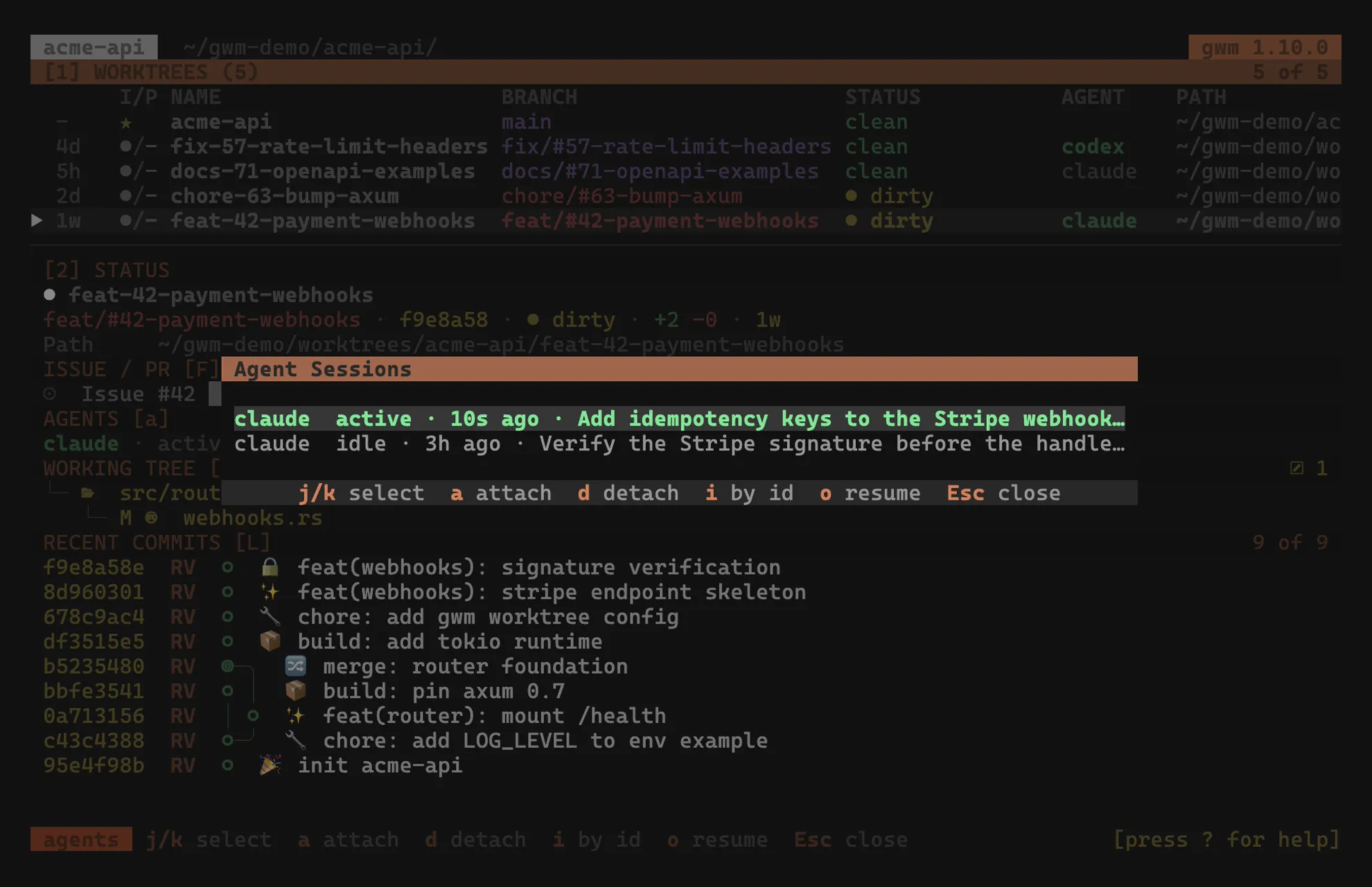
aoverlay, pictured above: every session attached to the selected worktree, most recent first, one row per session with the agent, its freshness, a human-readable last activity and the session name. A worktree with no session opens an explicit no agent session found row rather than a blank modal.
Detection runs off-thread and re-checks every 30 seconds, so nothing about it happens on the render path.
Pinning: when detection cannot know
Section titled “Pinning: when detection cannot know”Auto-detection matches a session to a worktree by the working directory the agent recorded. That fails in one common case: the agent was started from the main checkout and only later worked in the worktree, so its recorded directory names the wrong tree.
Pinning is the manual override. In the overlay, a pins the selected session to the worktree and d removes the pin; i opens an attach-by-id prompt that filters every detected session, including those matched to no worktree, which are exactly the ones worth pinning. Several pins can coexist on one worktree, and a pinned row is marked pinned.
The same override is available from the shell, which is what a script or a shell hook uses:
gwm agents # sessions per worktreegwm agents attach . <id> # pin <id> to the enclosing worktreegwm agents detach feat-42 # drop every pin on that worktreeFull flags in the CLI reference, under gwm agents.
Resuming: getting to the session
Section titled “Resuming: getting to the session”Pinning changes gwm’s bookkeeping, not where the session runs. o in the overlay is the key that takes you there: it opens a multiplexer pane running the selected session, in the worktree the overlay is about.
Not at the session’s recorded directory, which is the subtlety worth stating: a pinned session is pinned precisely because that directory names the wrong tree, and for a pinned Claude session it can be the slug directory under ~/.claude/projects rather than a worktree at all.
It is multiplexer only, and refuses with a status message otherwise. That is a design decision rather than a gap: the point is to put the session next to gwm, and the PTY overlay a [tui.macro*] falls back to would cover gwm instead. It opens at the level mux_open_in names, exactly as t does, so the two keys cannot disagree about what a keystroke opens. One refusal survives: a zellij tab takes no trailing command in any form, and there is nothing to type it into afterwards.
herdr takes two steps, and takes its time. It has no trailing-command form at any level, so gwm opens the container, waits for its new shell to reach a prompt, then types the line into it through the pane id herdr’s response carries. The wait is not optional: sent earlier, the line lands in the middle of the shell’s startup output and is silently dropped. On a worktree with direnv and a nix flake that was about a minute, so the whole sequence runs off the event loop and the status bar says opening agent pane… until it lands. gwm gives up after two minutes rather than leave a worker running, and says so.
The pane resumes the agent conversation rather than just landing a shell in the directory. What it runs per backend is [tui.agent_resume], with these defaults:
[tui.agent_resume]claude = "claude -r {session}"codex = "codex resume {session}"opencode = "opencode -s {session}"vibe = "vibe --resume {session}"They are configurable because these are four third-party CLIs on their own release cadence. Details in .gwm.toml schema → [tui.agent_resume].
A session marked ended resumes without comment, which is what resume is for. A live session is flagged on the status bar: resuming it in a second pane while it runs elsewhere may fork the conversation or be refused, depending on the tool.
Keys and machine surfaces
Section titled “Keys and machine surfaces”The overlay’s key table lives with the rest of the bindings, under agent sessions overlay (a); every verb is rebindable under [tui.keys.modal.detail].
Beyond the TUI, the same detection feeds an additive agents field on the JSON and daemon worktree rows (experimental tier, SCHEMA_VERSION stays 1) and the active-agent segment of gwm statusline.